


AI can make research faster, but speed only matters if you keep the depth.
Good research is not about tools. Good research is about understanding people clearly enough to make strong decisions.
This issue explains how to use AI to move quicker while protecting the rigor that makes research trustworthy.

In This Issue
• What AI can speed up
• What AI should never replace
• The hybrid research workflow
• How to keep quality high
• Examples
• Common mistakes
• Resource Corner
What AI can speed up
AI is excellent at processing large amounts of text or data.
AI means tools that generate summaries, organize information, or identify patterns quickly.
Here is what AI accelerates easily:
• Creating research plans
• Drafting interview questions
• Cleaning transcripts
• Summarizing long conversations
• Clustering themes
• Generating first-pass insights
• Turning findings into clearer sentences
These tasks save time but do not change your judgment.
What AI should never replace
There are parts of research AI cannot do for you.
• Understanding context
Context means the story around a user’s situation, emotions, and constraints.
• Interpreting contradictions
Contradictions happen when people say one thing but do another.
• Identifying root causes
Root causes explain why behavior happens, not just what happened.
• Knowing what matters
Relevance means understanding which insights actually change decisions.
Human judgment lives here.
AI can support it but cannot produce it.
The hybrid research workflow
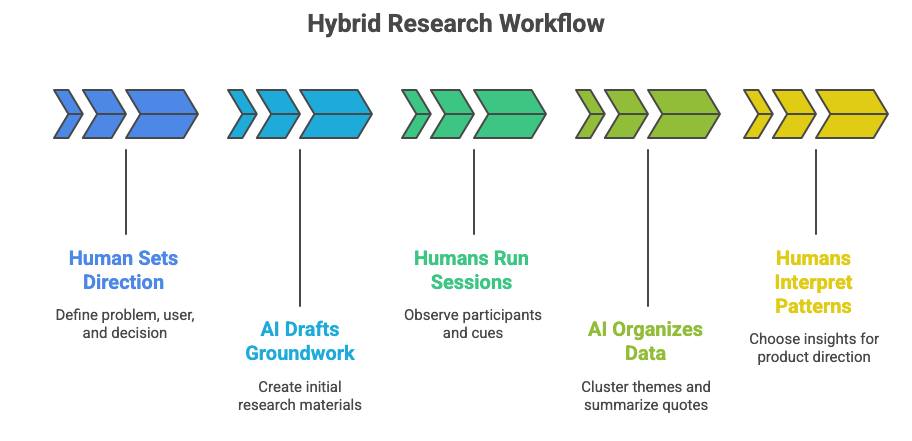
Use this five-step flow to keep speed and quality balanced.
1. Human sets the direction
Define the problem, the target user, and the decision the research must support.
Direction means knowing what you need to learn before collecting data.
2. AI drafts the groundwork
Ask AI to create a first version of research questions, scripts, or survey structures.
This removes repetitive setup work.
3. Humans run the sessions
Observe people directly. Pay attention to tone, hesitation, and nonverbal cues.
Observation means noticing what AI cannot pick up.
4. AI organizes raw data
Feed transcripts into AI tools to cluster themes, summarize quotes, or highlight moments of confusion.
Raw data means everything collected before interpretation.
5. Humans interpret patterns and decide what matters
You choose the insights that actually influence product direction.
Interpretation means understanding patterns deeply enough to recommend action.
This workflow gives you both speed and depth.
UX is changing fast………..
Roles are shifting.
Expectations are higher.
And many professionals are quietly asking, “Where do I go from here?”

UXCON25 gave people clarity.
It surfaced the real conversations happening behind the scenes.
It showed what’s working, what’s not, and what the future is asking of us.
UXCON26 is where we take that understanding further.
Not just to connect, but to sharpen your thinking, strengthen your voice,
and help you navigate the next chapter of your UX career with confidence.
If you want to move with intention, not uncertainty,
join us at UXCON26.
How to keep quality high when using AI
Use these guardrails to stay disciplined.
1. Always check AI summaries against the source
AI summaries are fast but not always accurate.
Verification means comparing the output with what users actually said.
2. Separate what AI generated from what you observed
Mark AI-generated ideas clearly so they do not mix with real findings.
Clarity means knowing which insights came from data.
3. Do not let AI create final insights
AI can draft, but humans must refine.
Final insights influence decisions, so they must come from understanding, not automation.
4. Validate AI-suggested patterns
Always check whether the pattern appears consistently in the raw data.
Validation means seeing real evidence behind the theme.
5. Use AI to reduce noise, not create answers
AI helps you move faster, but answers come from people.
Quality means staying grounded in real behavior.
Examples you can borrow
Example 1: Speeding up interview analysis
Before: Manually reviewing 15 transcripts for themes.
After: AI clusters quotes by behavior.
Human quality step: Read one transcript per cluster to confirm accuracy.
Example 2: Rapid survey cleanup
Before: Sorting 600 survey responses in spreadsheets.
After: AI groups open-ended answers into categories.
Human quality step: Check a few responses in each group to verify correctness.
Example 3: Faster insight communication
Before: Writing long summaries after each study.
After: AI drafts a structured summary.
Human quality step: Re-write the key insights in your own words.
Example 4: Clarifying user motivations
Before: Extracting motivations manually from interviews.
After: AI pulls all motivation-related statements.
Human quality step: Explain the motivation using human judgment, not AI phrasing.
AI reduces effort.
Humans ensure accuracy.
Common mistakes
• Letting AI define insights
• Skipping verification steps
• Mixing AI-generated ideas with user statements
• Over-trusting summaries
• Using AI to replace human interpretation
• Forgetting the goal of the research
Research is about understanding people.
AI does not understand people.
AI organizes what people said. You make meaning from it.
Resource Corner
Using AI for UX Work: Study Guide
Designing with AI: UX Considerations and Best Practices

Final Thought
AI makes research faster.
You make research meaningful.
If you let AI handle the heavy lifting and keep humans in charge of interpreting the truth, you get the best combination possible: speed, clarity, and decisions rooted in real user behavior.
Use AI as a power tool, not a replacement.
The quality comes from how you think, not what you automate.


